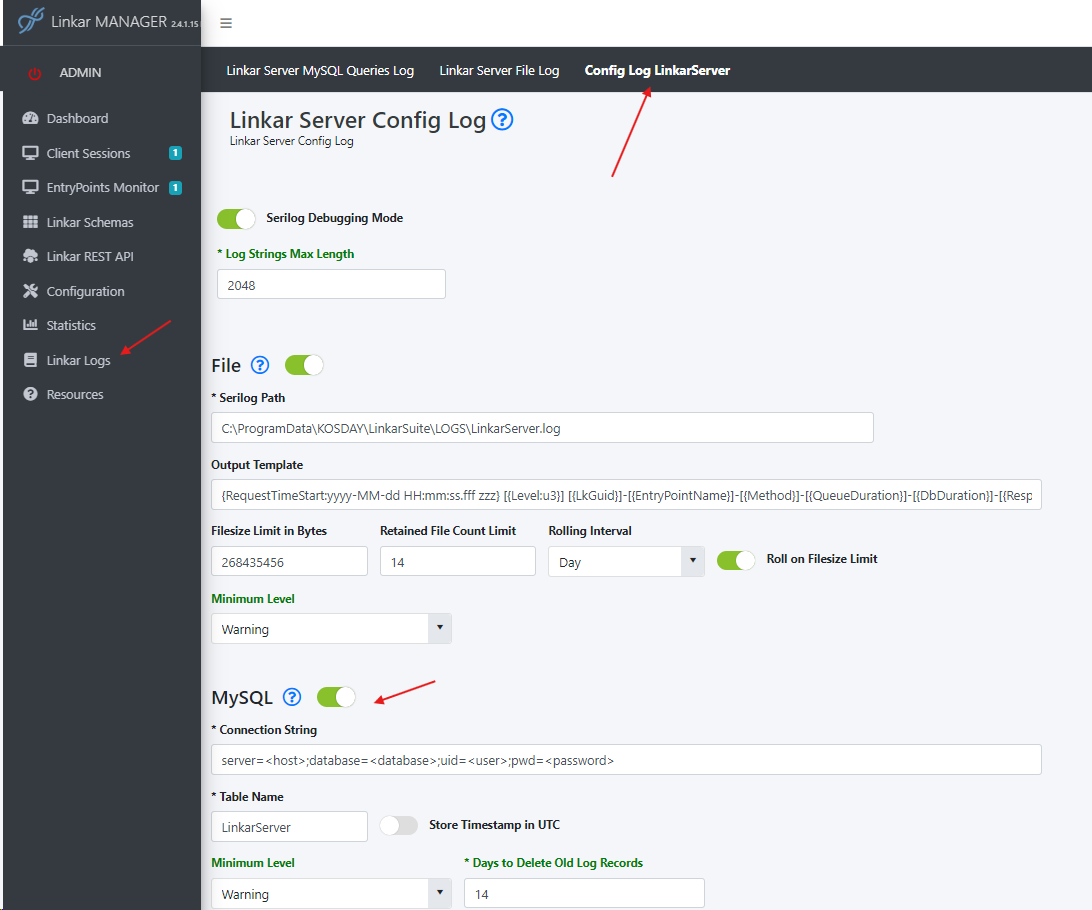
It is possible to use MySQL databases as the target for the logs. LinkarServer will NOT install a MySQL database, it will have to be installed beforehand and the credentials provided in order to access it. These credentials will have to be parsed into the "Connection String" property. If the table or database do not exist LinkarServer will create them with the information provided in the "Connection String" and Table Name" properties.
Field |
Type |
Description |
Connection String |
Required |
Contains the information to connecto to the database. It contains 4 important properties: •"server". IP address or DNS name for the system where MySQL is installed. •"database". The name for the database schema. "linkarlogs" by default. If the schema does not exist LinkarServer will create it. •"uid". The name for the MySQL user. It should have permissions to create schemas and tables. •"pwd". The password for the MySQL user. |
Table Name |
Required |
The name for the MySQL table where the logs will be stored. "LinkarServer" by default. If the table does not exist LinkarServer will create it. |
Store Timestamp in UTC |
Button |
If not enabled the timestamps will be saved in the local system's time. |
Minimum Level |
Select |
Serilog categorizes the information sent to the logs in different levels, according to the impact and importance of each entry. Setting the minimum level will exclude information above this level from the logs. For example a minimum level of "Warning" means Serilog will only log "Warning", "Error" and "Fatal" messages. LinkarServer sends data at the levels of "Information", "Warning" and "Error". |
Days to Delete Old Log Recors |
Numeric |
An automatic script will delete logs older than what is configured in this parameter in order to avoid oversaturation. |
In order to apply these changes they must first be saved via the "Save" button. The options that can be changed without having to restart LinkarServer are marked in green, any change to other options will require LinkarServer to be restarted.
When LinkarServer is started and MySQL logs are enabled it will try to connect with MySQL. If the database schema or table do not exist they will be created. When encountering any problems with the connection it is advised to enable "Serilog Debigging Mode" and analyze the "Serilog.LinkarServer.log" file for debugging.
After connecting to the database and creating the table an automatic script to delete old records will also be launched. This script will delete records older than 14 days by default. After changing any options a new script can be launched from a MySQL manager.
Script for old record deletion:
DROP EVENT IF EXISTS AutoDeleteOldLinkarServer;
CREATE EVENT AutoDeleteOldLinkarServer
ON SCHEDULE EVERY '1' DAY
STARTS '2026-01-01 00:00:00'
ON COMPLETION PRESERVE
DO
DELETE LOW_PRIORITY FROM linkarlogs.LinkarServer WHERE Timestamp < DATE_SUB(NOW(), INTERVAL 14 DAY);
Once the MySQL logs have been configured and LinkarServer is running any activity will start sending data to the log files. If the "Minimum Level" was configured to "Warning" data will only be logged when warnings or errors occur. You can test if the logging is working by setting the "Minimum Level" to "Information", which will log any operation to the database.
Once some data has been logged it can be viewed in the following section:
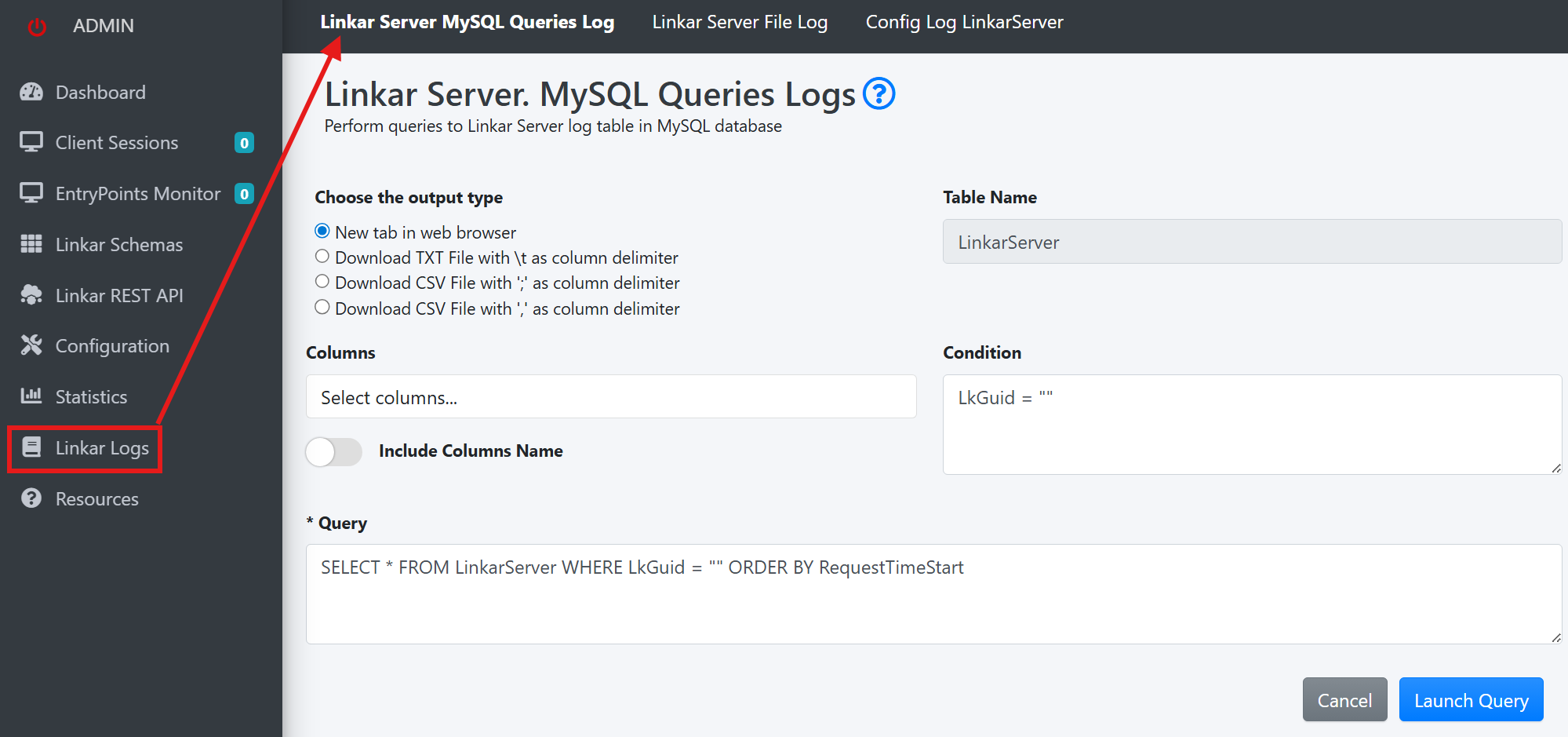
A query can be composed by typing it manually or using "Columns" and "Condition" to build it. If an error occurs, and if the LinkarServer alarm system is configured, automatic emails will be sent with information about the problem. The content sent will include the "LkGuid" property which identifies the operation that caused the error. In order to troubleshoot the issue a query to locate the problematic record can be formed by using the "LkGuid".
For example:
SELECT * FROM linkarlogs.LinkarServer WHERE LkGuid = "ad4d14b5-53e0-4829-b435-b5d981c4ba38" ORDER BY RequestTimeStart;
The query result can be parsed to 3 different file formats or sent directly to a new browser tab.
Queries can also be run from any MySQL manager, which will give you more control over query construction and data viewing. If the operation causing the error originated in LinkarWS it is possible to cross-reference the information from both LinkarWS and LinkarServer log tables, running a query such as:
SELECT linkarlogs.LinkarWS.*, linkarlogs.LinkarServer.*
FROM linkarlogs.LinkarWS
INNER JOIN linkarlogs.LinkarServer ON linkarlogs.LinkarServer.LkGuid = linkarlogs.LinkarWS.LkGuid
WHERE linkarlogs.LinkarWS.LkGuid = "ad4d14b5-53e0-4829-b435-b5d981c4ba38";
